The couple version
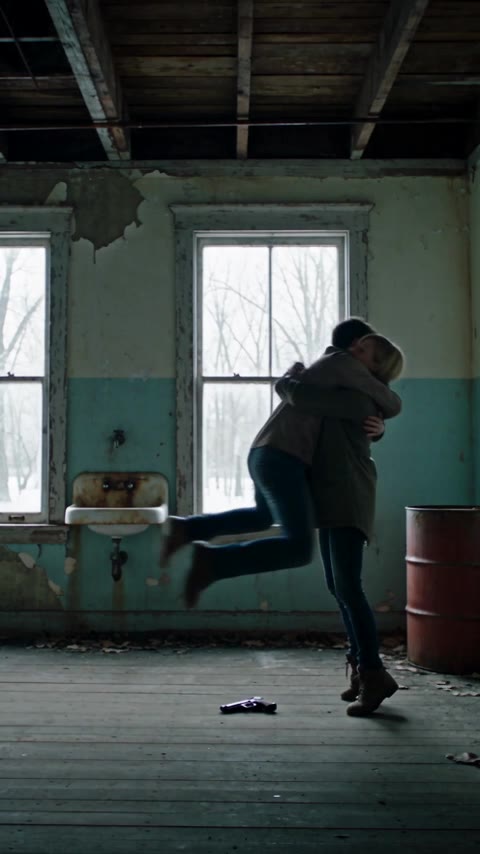
The couple version is the original zombie love story: two partners, one turns, the other cannot shoot. The survivor aims, cries, lowers the gun and opens their arms. The infected lover rushes in, and the scene cuts to a warm memory of the same embrace.
It works because the two faces are already a relationship. The viewer does not need a backstory; the photos do that work. The story is not “zombie attacks couple.” It is “can you still recognise the person you love?”
Who should be the zombie?
Either partner can turn. Pick the photo that reads more clearly as the infected lover: a face with strong features, a recognizable hairstyle, or a detail the survivor would notice — a necklace, a ring, a hoodie, a tattoo.
The survivor's face carries the emotional half. Choose a photo with a clear, front-facing expression; the model needs to show the hesitation and the decision, not just a pose. If one photo is sharper and more front-facing, use that one for the survivor.
Do not use the same photo twice. The two roles need two separate images. If you only have a couple photo, crop each person into a separate file if the faces are clear enough; otherwise take two new photos.
How the story plays
- The standoff. A cold, ruined room. The infected lover stands in front of the survivor, not behind them.
- The gun. The survivor aims, hands shaking, already in tears. The camera holds the survivor's face.
- Recognition. A familiar detail — a necklace, a ring, the way they tilt their head. The gun lowers.
- The charge. The lover screams and rushes forward. The survivor opens their arms.
- The cut. The instant they meet, the cold scene becomes a warm memory in the same pose.
- The memory. Laughing, walking hand in hand, sitting together at sunset. The camera pulls back and holds.
The couple version is usually played close: medium shots, faces in the frame, the gun as a foreground element rather than the subject. The memory can be a wheat field, a beach, a garden or a city rooftop; the important part is the warm light and the matching pose.
Photo tips for couples
- One person per photo. Do not upload a group photo and hope the model picks the right face.
- Front-facing, even light. Both eyes visible; no sunglasses, masks or heavy filters.
- Half-body is often better than a tight close-up. It carries the outfit into the video and gives the model more context.
- Use a detail the other person would recognise. A necklace, a ring, a collar, a hoodie, a particular hairstyle.
- Keep the two photos visually compatible. Similar lighting and crop help the model place both people in the same room.
If one partner has a very different skin tone or hair colour from the other, that is fine — the model uses each photo separately. The risk is not difference; it is a low-detail photo.
What to avoid
- A group photo. The model may choose the wrong person. Crop each face into its own file only if both faces are clear.
- The same photo twice. The two roles need two separate references; a duplicate can make the model merge them.
- Heavy beauty filters. The model copies the filtered face, not the real one.
- Action poses. A photo where someone is already running or fighting gives the model a conflicting instruction for the standoff.
- A tiny face in a wide shot. The likeness needs pixels; a close crop is usually better.
If you only have a couple photo, do not upload it as both references. Take two new photos, or crop each person into a separate file if the faces are sharp enough.
The couple example
The sample on this page is a real render from this pipeline: two photos in, a 15-second story out. It shows the cold present, the lowered gun, the leap and the warm memory. It is an example of the format, not a customer testimonial, and a new render will not match it frame for frame.
If you want the same structure, use the couple version in the maker. The setting and the format can change; the six beats stay the same.
Settings and format
Choose 9:16 if you are posting to TikTok, Reels or Shorts. Choose 16:9 for YouTube or a wider frame. The couple version reads well in both because the two faces can share the frame.
The three scene settings — Snowed-In Cabin, Rain-Soaked City and Ruined Chapel — change the cold half. The memory half is warm in all three. Pick the one that fits the story you want to tell, not the one that looks most dramatic in a still.
FAQ
Can I make a zombie couple video with my partner?
Yes, if both of you agree to appear. Use one clear photo of each person and choose who turns.
Who should be the zombie?
Either partner. Pick the photo with the clearer face and the more recognisable detail. The survivor's photo should show the face clearly enough to carry the hesitation.
Can I use a friend instead of a partner?
Yes. The structure is the same; use two photos of adults who have agreed to appear. The memory can be a trip or a shared hobby instead of a romantic scene.
Does the video include music?
Yes. The clip includes sound. You can still add a trending song when you post it.
Is it scary?
The opening is a zombie scene, but the story avoids a gunshot and graphic gore. The focus is the recognition and the hug, not the horror.